일상대화 API
심심이챗봇공방(SimSimi Workshop Services, SWS)은 전세계 4억 명 이상의 사용자들에게 즐거움을 제공해 온 일상대화챗봇 '심심이'를 바탕으로 서비스를 제공합니다. '심심이'가 꾸준히 성공적으로 서비스를 해 올 수 있었던 이유는, 세계 각지에서 다양한 배경을 가진 2천 7백만 명 이상의 패널들이 각자의 재치와 영감을 담아 만들어 온 생동감 넘치는 1억 5천만 건 이상의 일상대화 전용 대화세트들에 있습니다. 일상대화 API는 이 대화세트들과 심심이팀의 대화처리엔진 AICR를 활용해서 당신의 챗봇이 사용자들에게 웃음과 힐링을 제공할 수 있도록 돕습니다.
작동원리
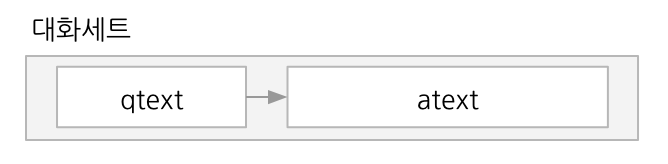
각 대화세트(talkset)는 질문문장(qtext)과 답변문장(atext)의 쌍으로 이루어집니다.
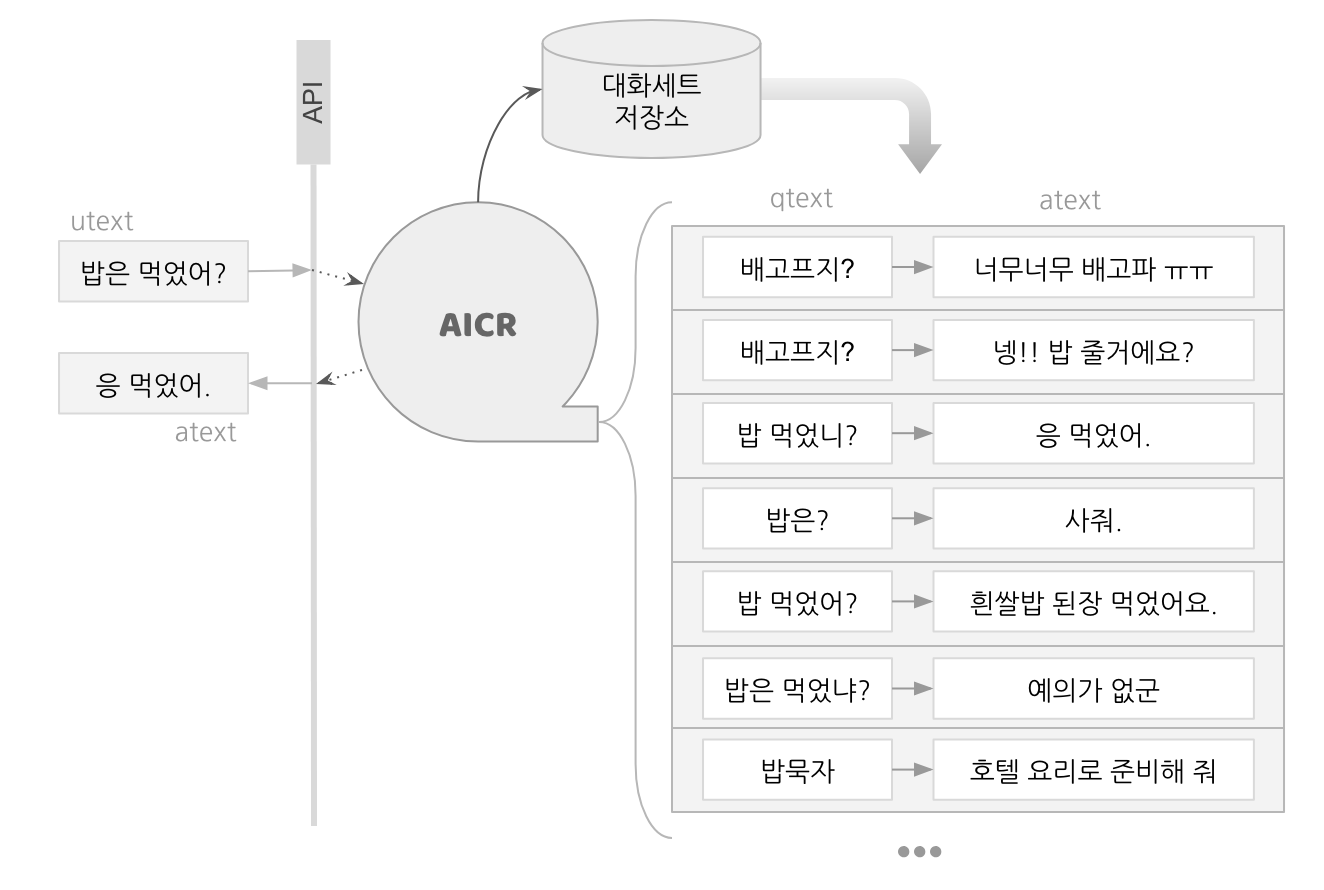
심심이 대화처리엔진(AICR)은 수많은 대화세트들이 쌓여 있는 대화세트 저장소에서 적절한 응답을 찾는 작업을 합니다. 일상대화 API를 통해 요청이 접수되면 AICR은 대화세트 저장소에서 사용자문장(utext)과 유사도 등의 관련성이 높은 질문문장(qtext)들을 찾아서 후보군을 만들고, 요청에 포함된 파라미터들과 다른 조건들을 고려하여 가장 적절한 하나의 대화세트를 선택합니다.
일상대화 API가 제공하는 답변문장(atext)은 이 과정에서 선택된 대화세트의 답변문장(atext)입니다. 예를 들어 요청의 utext가 "밥은 먹었어?"일 때 일상대화 API는 다음과 같은 과정을 거쳐 atext로 "응 먹었어"를 반환합니다.
기본요청
일상대화 API 엔드포인트(https://wsapi.simsimi.com/{VERSION}/talk)를 향해 프로젝트키, 필수파라미터 2개(사용자문장 utext, 언어코드 lang)를 명시하여 POST 요청하면 응답을 받을 수 있습니다.
요청예시
curl -X POST https://wsapi.simsimi.com/190410/talk \
     -H "Content-Type: application/json" \
     -H "x-api-key: PASTE_YOUR_PROJECT_KEY_HERE" \
     -d '{
            "utext": "안녕",
            "lang": "ko"
}' utext: 사용자문장lang: 사용자의 언어코드(일상대화 API가 지원하는 언어 및 언어코드)
응답예시
{
  "status":200,
  "statusMessage":"Ok",
  "atext":"뭐이눔아",
  "lang":"ko",
  "request":{
    "utext":"안녕",
    "lang":"ko"
    }
} atext: 답변문장request: 요청 본문status,statusMessage: 상태정보 (상태코드표 참조)
응답제어
각 챗봇의 성격에 맞는 응답을 제공하기 위해 응답을 조절하기 위한 옵션들을 제공합니다.
요청예시
대한민국 또는 미국에서 생성된 대화세트 중에서 나쁜말확률 70% 이하인 문장만을 답변으로 제공받고자 하는 경우 다음과 같이 country, atext_bad_prob_max 두 개의 옵션을 추가해서 요청하면 됩니다.
curl -X POST https://wsapi.simsimi.com/190410/talk \
     -H "Content-Type: application/json" \
     -H "x-api-key: PASTE_YOUR_PROJECT_KEY_HERE" \
     -d '{
            "utext":"안녕",
            "lang": "ko",
            "country" : ["KR", "US"],
            "atext_bad_prob_max": 0.7
     }'
응답제어 옵션
country: 대화세트 생성국가 필터. 영어, 스페인어와 같이 여러 국가에서 사용되는 언어에서 특정 국가(들)에서 생성한 대화세트들로 응답후보를 한정할 수 있습니다. (ISO-3166-1 alpha-2 국가코드를 10개까지 열거할 수 있음, 미지정시 모든 국가를 대상으로 함.)atext_bad_prob_max,qtext_bad_prob_max,talkset_bad_prob_max: 문장의 나쁜말확률 최댓값. 챗봇의 대답에서 나쁜말을 억제하는 용도로 사용합니다. 많은 경우 응답문장 나쁜말확률 최댓값(atext_bad_prob_max)을 적절히 조절하면 충분하며, 질문문장과 대화세트의 나쁜말확률(qtext_bad_prob_max,talkset_bad_prob_max)을 추가로 지정해서 더 보수적으로 제어할 수 있습니다. 대화세트의 나쁜말확률은 질문문장과 답변문장을 합쳐서 하나의 문장으로 보고 판별합니다. 소숫점 1자리의 확률값 (0.0 ~ 1.0, 미지정시 기본값 0.0)atext_bad_prob_min: 응답문장의 나쁜말확률 최솟값. 챗봇이 나쁜말을 주로 하도록 할 때 사용할 수 있는 옵션입니다. 상당수 챗봇 플랫폼들은 컨텐츠의 건전성과 관련된 제한이 있으니 사용에 유의하시기 바랍니다. 소숫점 1자리의 확률값 (0.0 ~ 1.0, 미지정시 기본값 0.0)atext_length_max,atext_length_min: 응답문장의 길이 범위 지정. 챗봇의 성격이나 대화 상황에 따라서 응답문장의 길이 범위를 정할 수 있습니다.(1 ~ 256의 정수, 미지정시 기본값atext_length_max은 256,atext_length_min은 1 )regist_date_max,regist_date_min: 대화세트(talkset) 등록일 범위 지정. 최신 트랜드에 민감한 챗봇, 과거에 머물러 있는 챗봇 등을 구현하기 위해 사용할 수 있습니다.(yyyy-MM-dd HH:mm:ss형식으로 사용, 미지정시 기본값regist_date_max는 현재시간,regist_date_min은 최초의 대화세트 등록일)서비스 종료ko_polite_converter: 한국어 응답을 존댓말로 전환. 챗봇이 반말로 하는 응답을 존댓말로 전환해 줍니다.lang이ko인 경우에만 사용 가능합니다. (true|false, 미지정시 기본값false)suppress_ko_person_name: 한국어 응답에서 사람의 이름 노출 제어. 챗봇의 응답에서 한국어권 사람의 이름이 나타나는 것을 막을 수 있습니다.lang이ko인 경우에만 사용 가능합니다. (R: 일반적인 이름을 대부분 걸러냅니다.)
가르치기 API 연계 옵션
teach_api_key: 연계하여 사용하고 싶은 가르치기 API 프로젝트의 API 키를 입력하시면 가르친 대화세트를 우선적으로 대답합니다. utext와 관련하여 가르친 대화세트가 없다면 파라미터를 넣지 않은 경우와 똑같은 결과가 나옵니다. 가르친 대답세트가 나오는 경우 다른 응답제어, 추가정보 파라미터들과 연동되지 않습니다.teach_key: 가르치기 API를 사용했을 때 입력한 teach_key에 해당하는 대화세트들만 대답하게 할 수 있습니다. teach_key와 상관없이 대답이 나오길 바라는 경우 입력하지 않아도 무방합니다. 가르친 대화세트 중 입력한 teach_key에 해당하는 것이 없다면 teach_api_key 파라미터를 넣지 않은 경우와 똑같은 결과가 나옵니다.
추가정보
일상대화 API는 응답에 대한 자세한 정보를 얻을 수 있는 방법을 제공합니다. 요청 본문의 cf_info 오브젝트에 제공받고자 하는 추가정보들을 예시와 같이 열거하여 요청합니다.
요청예시
curl -X POST https://wsapi.simsimi.com/190410/talk \
     -H "Content-Type: application/json" \
     -H "x-api-key: PASTE_YOUR_PROJECT_KEY_HERE" \
     -d '{
            "utext":"안녕",
            "lang": "ko",
            "cf_info" : [
                  "qtext",
                  "country",
                  "atext_bad_prob",
                  "atext_bad_type",
                  "regist_date"
            ],
     }'
응답예시
{
    "status" : 200,
    "statusMessage" : "OK",
    "atext" : "안녕 오늘날씨 참 좋지?",
    "lang" : "ko",
    "utext" : "안녕",
    "qtext" : "안녕~~",
    "country" : "KR",
    "atext_bad_prob" : 0.0,
    "atext_bad_type" : "dpd",
    "regist_date" : "2017-07-08 08:24:37"
}
추가정보 요청 옵션
qtext: 답변문장(atext)과 쌍인 질문문장(qtext)country: 대화세트 생성 국가의 국가코드(ISO-3166-1 alpha-2)atext_bad_prob: 답변문장(atext)의 나쁜말 확률atext_bad_type: 답변문장의 나쁜말 확률(atext_bad_prob) 추정 시 사용한 판별 방식.STAPX,DPD,WPF,HB10A중 하나. (판별방식에 대한 자세한 설명 )regist_date: 대화세트 생성 시점
일상대화 지원언어
대부분의 언어코드는 ISO-639-1과 동일하지만, 다른 사례(*)가 있으니 주의하세요.
| 언어명 | 언어명(네이티브) | 언어코드 |
|---|---|---|
| 갈리시아어 | Galego | gl |
| 구자라트어 | ગુજરાતી | gu |
| 그루지야어 | ქართული | ka |
| 그리스어 | Ελληνικά | el |
| 네덜란드어 | Nederlands | nl |
| 네팔어 | नेपाली | ne |
| 노르웨이어(보크몰) | Norsk | nb |
| 덴마크어 | Dansk | da |
| 독일어 | Deutsch | de |
| 라트비아어 | Latviešu | lv |
| 러시아어 | русский | ru |
| 루마니아어 | Română | ro |
| 리투아니아어 | Lietuvių | lt |
| 마라티어 | मराठी | mr |
| 마케도니아어 | македонски | mk |
| 말라얄람어 | മലയാളം | ml |
| 말레이어 | Melayu | ms |
| 몽골어 | Монгол | mn |
| 바스크어 | Euskara | eu |
| 버마어 | မြန်မာဘာသာ | my |
| 베트남어 | Tiếng Việt | vn* |
| 벨로루시어 | беларуская | be |
| 벵골어 | বাংলা | bn |
| 보스니아어 | Bosanski | bs |
| 불가리아어 | български | bg |
| 세르비아어 | српски | rs* |
| 세부아노 | Cebuano | cx* |
| 스와힐리어 | Kiswahili | sw |
| 스웨덴어 | Svenska | sv |
| 스페인어 | Español | es |
| 슬로바키아어 | Slovenčina | sk |
| 슬로베니아어 | Slovenščina | sl |
| 신할라어 | සිංහල | si |
| 아랍어 | العربية | ar |
| 아르메니아어 | հայերեն | hy |
| 아이슬란드어 | íslenska | is |
| 아제르바이잔어 | Azərbaycanca | az |
| 아프리칸스어 | Afrikaans | af |
| 알바니아어 | Shqip | al* |
| 에스토니아어 | Eesti | et |
| 영어 | English | en |
| 우르두어 | Урду | ur |
| 우즈베크어 | O‘zbek | uz |
| 우크라이나어 | українська | uk |
| 웨일즈어 | Cymraeg | cy |
| 이탈리아어 | Italiano | it |
| 인도네시아어 | Bahasa Indonesia | id |
| 일본어 | 日本語 | ja |
| 중국어 | 中文 | ch* |
| 체코어 | čeština | cs |
| 카자흐어 | қазақ | kk |
| 카탈로니아어 | Català | ca |
| 칸나다어 | ಕನ್ನಡ | kn |
| 캄보디아어 | ភាសាខ្មែរ | kh* |
| 쿠르드어 | Kurdî (Kurmancî) | ku |
| 크로아티아어 | Hrvatski | hr |
| 타갈로그어 | Filipino | ph* |
| 타밀어 | தமிழ் | ta |
| 타직어 | Тоҷикӣ | tg |
| 태국어 | ภาษาไทย | th |
| 터키어 | Türkçe | tr |
| 텔루구어 | తెలుగు | te |
| 파슈토어 | پښتو | ps |
| 펀자브어 | ਪੰਜਾਬੀ | pa |
| 페르시아어 | فارسی | fa |
| 포르투갈어 | Português | pt |
| 폴란드어 | Polski | pl |
| 프랑스어 | Français | fr |
| 프리지아어 | Frysk | fy |
| 핀란드어 | Suomi | fi |
| 한국어 | 한국어 | ko |
| 헝가리어 | Magyar | hu |
| 히브리어 | עברית | he |
| 힌디어 | हिन्दी | hi |
| 아삼어 | অসমীয়া | as |
| 브르타뉴어 | Brezhoneg | br |
| 과라니어 | Guarani | gn |
| 자바어 | Basa Jawa | jv |
| 오리야어 | ଓଡ଼ିଆ | or |
| 키냐르완다어 | Ikinyarwanda | rw |
| 중국어 (번체) | 繁體中文 | zh* |
일상대화 상태코드표
status | statusMessage | 설명 |
|---|---|---|
| 200 | OK | 정상 |
| 227 | Parameter Required | 필수 파라미터 누락 |
| 228 | Do Not Understand | 질문에 대한 답변을 찾을 수 없음 |
| 403 | Unauthorized | 유효하지 않은 API Key |
| 429 | Limit Exceeded | 사용 한도 초과 |
| 500 | Server error | 서버 오류 |
나쁜말확률
나쁜말확률은 불건전한(또는 악성) 문장을 구별하기 위해 심심이팀이 개발한 지표입니다. 뛰어난 성능을 보이는 고급 딥러닝 기술을 포함해 다양한 기법을 동원하여 산출합니다. 자세한 내용은 다음 블로그 포스트를 참고하시기 바랍니다. (심심이 대화 품질 - 나쁜말 필터 관련 기술)
나쁜말점수 API
세계 최고 성능의 대화체 문장 분류 기술로 게임 내 채팅, 실시간 방송 채팅, 게시판 덧글, 다국어 커뮤니케이션 등에서 욕설이나 선정적인 문장을 정확하고 유연하게 판별해 낼 수 있습니다. 전통적인 단어와 문구 필터 방식(WPF)에서도 다양한 옵션을 제공하며 통계 기반의 확률적 유사성 기반 분류 기법(STAPX)은 가장 많은 언어를 커버합니다. 심층신경망 모델 기반 문장 분류 기법(DPD)은 99.3% 이상의 F1 Score를 기록하였으며(한국어 기준) 크라우드소싱으로 10명의 패널이 검증하는 최상위 신뢰도의 분류 기법(HB10A)까지 활용할 수 있습니다.
판별 범위와 점수 기준
심심이 컨텐츠 금지 규정에 해당하는 문장에 높은 점수가 부여됩니다.
심심이 컨텐츠 금지 규정주로 '채팅에 사용되는 대화체 문장'에서, '문장 자체가 직접적으로 나쁜말(판별기준 참고)에 해당하는 표현'을 판별합니다. 이전 대화의 맥락, 상대방의 대화와 조응하여 형성되는 의미 및 중의적 표현은 판별 범위에서 제외됩니다.
요청
나쁜말 판별기 API 엔드포인트(https://wsapi.simsimi.com/{VERSION}/classify/bad)를 향해 프로젝트키, 필수파라미터 3개(문장 sentence, 언어코드 lang, 타입 type)를 명시하여 POST 요청하면 응답을 받을 수 있습니다.
요청예시
curl -X POST https://wsapi.simsimi.com/190410/classify/bad \
     -H "Content-Type: application/json" \
     -H "x-api-key: PASTE_YOUR_PROJECT_KEY_HERE" \
     -d '{
            "sentence": "시발",
            "lang": "ko",
            "type": "DPD"
}' sentence: 사용자문장lang: 사용자의 언어코드(나쁜말 판별기 API가 지원하는 언어 및 언어코드)type: 나쁜말 판별에 사용할 기법. 현재는 DPD만 지원합니다.
응답예시
{
  "status":200,
  "statusMessage":"Ok",
  "bad":"0.999993",
  "request":{
    "sentence":"시발",
    "lang":"ko"
    }
} bad: 문장이 나쁜 말일 확률request: 요청 본문status,statusMessage: 상태정보 (상태코드표 참조)
나쁜말점수 지원언어
대부분의 언어코드는 ISO-639-1과 동일하지만, 다른 사례(*)가 있으니 주의하세요.
| 언어명 | 언어명(네이티브) | 언어코드 | F1 Score |
|---|---|---|---|
| 말레이어 | Melayu | ms | 0.8984 |
| 베트남어 | Tiếng Việt | vn* | 0.9132 |
| 아랍어 | العربية | ar | 0.9432 |
| 영어 | English | en | 0.9847 |
| 인도네시아어 | Bahasa Indonesia | id | 0.9497 |
| 터키어 | Türkçe | tr | 0.9502 |
| 포르투갈어 | Português | pt | 0.9836 |
| 프랑스어 | Français | fr | 0.9376 |
| 한국어 | 한국어 | ko | 0.9930 |
나쁜말점수 상태코드표
status | statusMessage | 설명 |
|---|---|---|
| 200 | OK | 정상 |
| 403 | Unauthorized | 유효하지 않은 API Key |
| 429 | Limit Exceeded | 사용 한도 초과 |
| 500 | Server error | 서버 오류 |
가르치기 API
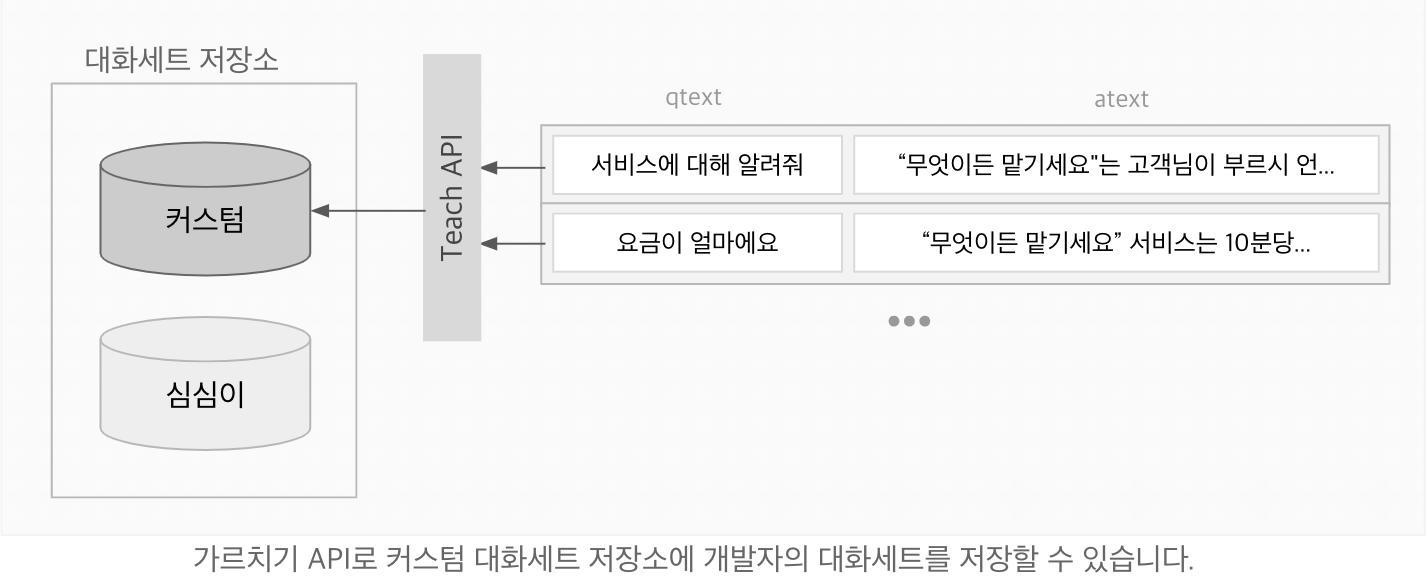
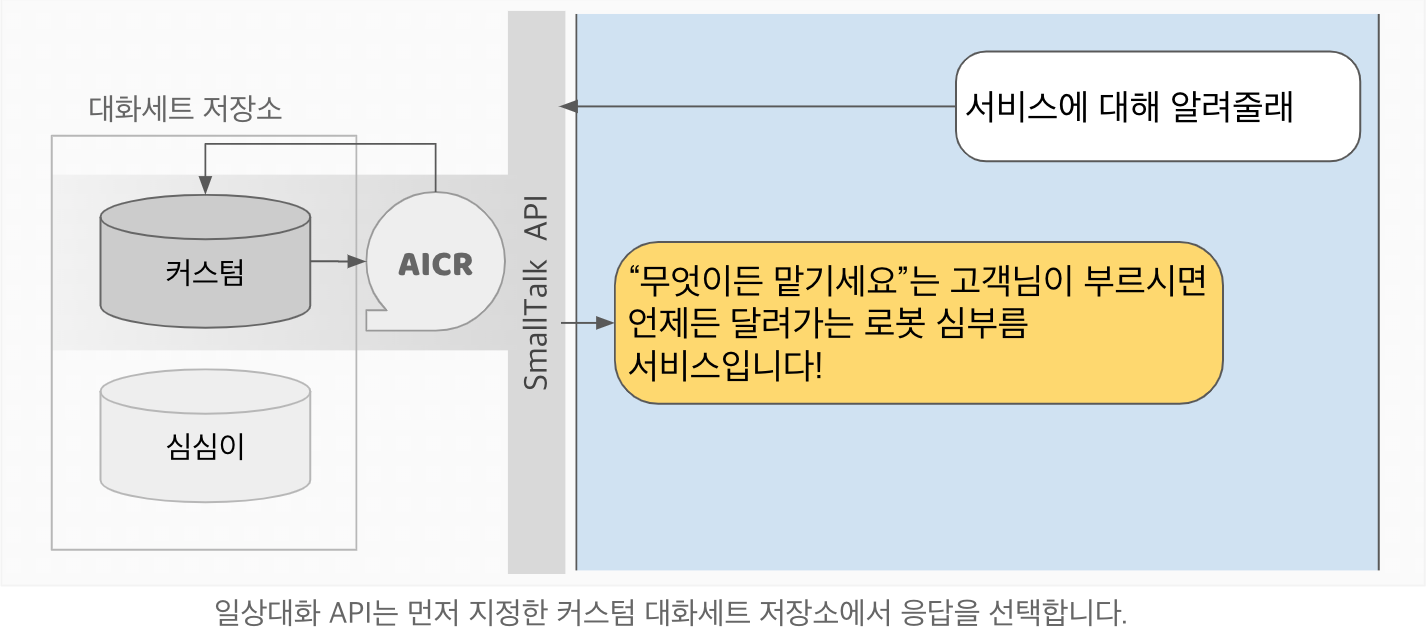
일상대화 API를 사용하면서 가르치기 API로 저장한 대화세트들을 우선적으로 대답하게 할 수 있습니다. 가르치기 API의 기능을 사용하고 싶다면 일상대화 API Standard 버전이 필요합니다.
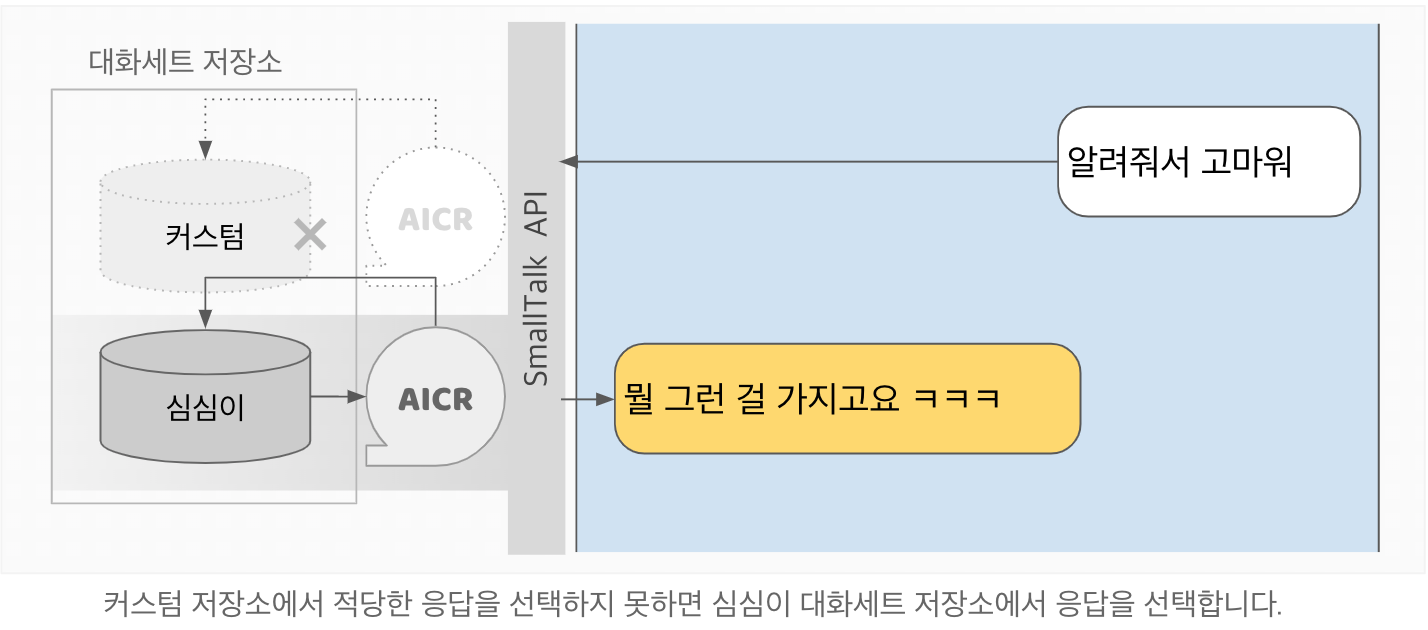
가르치기
가르치기 API 엔드포인트(https://wsapi.simsimi.com/{VERSION}/teach) 를 향해 프로젝트키, 필수파라미터 4개(문장 qtext, 답변 atext, 언어코드 lang, 키 teach_key)를 명시하여 POST 요청하면 해당 프로젝트에 대화세트가 저장됩니다. teach_key 값은 가르치는 대화세트들을 그룹화하는데 사용할 수 있습니다.
요청예시
curl -X POST https://wsapi.simsimi.com/190410/teach \
     -H "Content-Type: application/json" \
     -H "x-api-key: PASTE_YOUR_PROJECT_KEY_HERE" \
     -d '{
            "qtext": "심심아 안녕",
            "atext": "안녕, 반가워",
            "lang": "ko",
            "teach_key": "example"
}' qtext: 사용자문장atext: 답변문장lang: 사용자의 언어코드teach_key: 대화세트를 분류하는 키값
응답예시
{
  "status":200,
  "statusMessage":"Ok",
  "request":{
    "qtext": "심심아 안녕",
    "atext": "안녕, 반가워",
    "lang": "ko",
    "teach_key": "example"
  }
} request: 요청 본문status,statusMessage: 상태정보 (상태코드표 참조)
일상대화 API와의 연계
프로젝트의 api키와 teacy_key를 사용하여 일상대화 API와 연계가 가능합니다. 가르치기 API로 저장한 대화세트는 일상대화 API에서 우선적으로 사용하실 수 있습니다. 사용 방법은 응답제어를 참조하십시오.
관리 페이지
프로젝트 대시보드를 통해 관리페이지로 접근할 수 있습니다. 현재 관리 페이지에서는 가르친 대화세트들의 열람과 삭제가 가능합니다.
가르치기 상태코드표
status | statusMessage | 설명 |
|---|---|---|
| 200 | OK | 정상 |
| 403 | Unauthorized | 유효하지 않은 API Key |
| 500 | Server error | 서버 오류 |
구현 예시
API 사용자들이 포스팅한 사용법, 구현 예시, 코드 등입니다.